
Discover how operational automation boosts efficiency, reduces costs, and enhances consistency, delivering quick ROI for managers.

Advantages of Operational Automation for Ops Managers

Operational automation delivers faster throughput, higher process consistency, and lower operating cost, and it does this in ways that show up on a balance sheet within a single fiscal quarter, not years. Many businesses now report using AI for at least one work-related task, according to Coursera's research on operational efficiency, and that adoption curve tracks a broader shift: automation has moved from a back-office curiosity to the default operating model for any process that repeats often enough to matter. Microsoft's Well-Architected guidance frames this precisely. Automate the procedural, repeatable work first, treat that automation as a real workload with its own monitoring and testing discipline, and the ROI follows. Beyondsensor sees the same pattern play out across physical security deployments, where sensor data replaces manual patrol logs and slashes response lag.
Three benefits drive nearly all of the measurable business impact:
- Speed: cycle times drop because tasks move without waiting on a person's queue, inbox, or shift schedule.
- Quality and compliance: rules get applied the same way every time, which cuts error rates and produces a built-in audit trail.
- Cost and ROI: fewer manual hours per transaction means lower cost per unit of work, often within months for high-frequency processes.
Key Takeaways
Operational automation works best when it targets high-frequency processes first, treats governance as a design requirement rather than an afterthought, and measures cost and quality gains from week one.
| Point | Details |
|---|---|
| Start with high-frequency tasks | Score candidates on frequency, variability, error cost, and feasibility before piloting. |
| Measure before you automate | Baseline cost per transaction and cycle time so ROI is provable, not assumed. |
| Budget for governance | Assign an owner, version workflows, and set a maintenance budget from day one. |
| Expect 20% to 35% cost gains | High-frequency workflow automation commonly cuts hours or cost per execution in that range. |
| Pilot narrow, then scale | A single-owner, six-to-eight-week pilot with one success metric outperforms broad rollouts. |
Table of Contents
- What Are the Core Advantages of Operational Automation?
- How Does Automation Improve Operational Efficiency and Productivity?
- How Does Automation Reduce Errors and Strengthen Compliance?
- What Cost Savings and ROI Should You Expect From Automation?
- Can Automation Handle Growth Without Adding Headcount?
- Does Automation Improve Decision-Making and Analytics?
- How Does Automation Affect Employees and Customer Satisfaction?
- Which Processes Should You Automate First?
- What Are the Biggest Pitfalls in Automation Projects?
- Which Tools Fit Which Automation Problem?
- What Does Sensor-Driven Automation Look Like in Practice?
- An Editorial Take on Where Automation Advice Goes Wrong
- Frequently Asked Questions
- Sources
What Are the Core Advantages of Operational Automation?
Here's the short list ops and IT managers actually need before deciding where to spend their next automation budget:
- Speed: automated routing and scheduled jobs cut cycle time from hours to minutes on repeatable tasks.
- Productivity: staff hours shift from data entry and status-checking to judgment work.
- Quality: rule-based execution removes the variability that causes rework and customer complaints.
- Compliance: every automated step logs itself, so audits take days instead of weeks.
- Cost savings: lower cost per transaction, particularly on volume workflows that never sleep.
- Scalability: demand spikes get absorbed by software capacity, not overtime approvals.
- Resiliency: processes keep running through staff turnover, illness, or shift gaps.
- Analytics-driven decisions: dashboards reflect what happened an hour ago, not last quarter.
- Employee experience: less burnout from repetitive tasks, more time on problems that need a human.
- Customer satisfaction: faster response times and fewer errors reaching the customer.
Each of these maps to a KPI a finance or operations leader already tracks. That's the point. Automation isn't a separate initiative bolted onto operations. It's a lever on the metrics already on your dashboard.
How Does Automation Improve Operational Efficiency and Productivity?
The primary productivity gain from operational automation is lower manual touch per transaction and a shorter cycle time from request to resolution. When a task no longer waits on a person to notice it, pick it up, and process it manually, the elapsed time collapses, even if the actual "work" takes the same number of seconds to execute.
Three automation patterns account for most of the throughput gains ops teams report:
- Orchestration platforms that hand off work between systems automatically instead of relying on someone to copy data between them.
- CI/CD pipelines that deploy code and configuration changes without a manual release process, cutting deployment cycle time from days to minutes.
- Robotic process automation (RPA) applied to high-frequency, rules-based tasks like invoice matching, data reconciliation, or ticket triage.
Track these KPIs to prove the gain: cycle time reduction (start to finish, per transaction), percentage of transactions handled without human intervention, and FTE-hours saved per week on the automated process. An enterprise AI toolkit deployment at Microsoft's own business operations group cut cost per transaction and lifted process quality significantly after automating high-volume workflows, according to Microsoft's internal case study. That's not a hypothetical range. It's what happens when a company with enormous transaction volume applies automation to the right process.
Statistic callout: Consulting engagements that redesign high-frequency workflows around automation commonly produce a 20% to 35% reduction in hours per process execution, a range that compounds into durable margin improvement rather than a one-time bump.
How Does Automation Reduce Errors and Strengthen Compliance?
Automation reduces process variability, and less variability means fewer errors and a cleaner audit trail. Every time a rule gets applied by software instead of a person interpreting a policy on a Tuesday afternoon, the outcome is identical to the outcome on Monday and the outcome next Friday. Britannica's analysis of automation notes that automated systems typically perform tasks with less variability than humans, which translates into tighter control, more consistent output, and less waste of materials or rework.
That consistency shows up in a handful of concrete ways:
- Fewer data-entry errors because information moves system-to-system instead of being retyped.
- Reproducible approval chains, so two similar requests get the same decision instead of depending on who reviewed them.
- Stronger evidence for regulators and auditors, since automated systems log every step by default.
- Lower "bus factor" risk. Codifying tribal knowledge into a workflow means the process survives when the one person who knew it leaves, a risk documented in the software supply chain literature on the bus factor.
Pro Tip: Before scaling an automated approval or compliance check to full production, run it in shadow mode alongside the existing manual process for two to four weeks. Compare outcomes line by line. Discrepancies at this stage are cheap to fix; discrepancies discovered after a regulator asks for records are not.
What Cost Savings and ROI Should You Expect From Automation?
Automation typically delivers measurable cost reductions within months, not years, when it targets a high-frequency, high-volume process. That timeline is the reason finance teams like automation projects more than most capital investments: the payback period is short and the savings are traceable to a specific line item.
Direct and indirect costs worth measuring before and after automation include:
- Cost per transaction (labor plus system cost, divided by volume).
- FTE-hours consumed by the manual version of the process.
- Rework cost from errors caught downstream.
- Downtime or delay cost when the manual process backs up.
- Management overhead spent supervising and correcting manual work.
Targeted automation projects commonly cut process costs by 20% to 30% when applied to high-frequency workflows, based on findings from Cyndra's operational efficiency framework, and workflow redesign paired with automation produces a comparable 20% to 35% reduction in hours per execution according to the World Consulting Group's margin research.
| Metric | Typical Range | Source |
|---|---|---|
| Cost per transaction reduction | 20% to 30% | Microsoft case study, Cyndra framework |
| Hours per process execution reduction | 20% to 35% | World Consulting Group |
| Process quality improvement | Up to ~80% | Microsoft case study |
| Time to measurable ROI | Weeks to a few months | Cyndra framework |
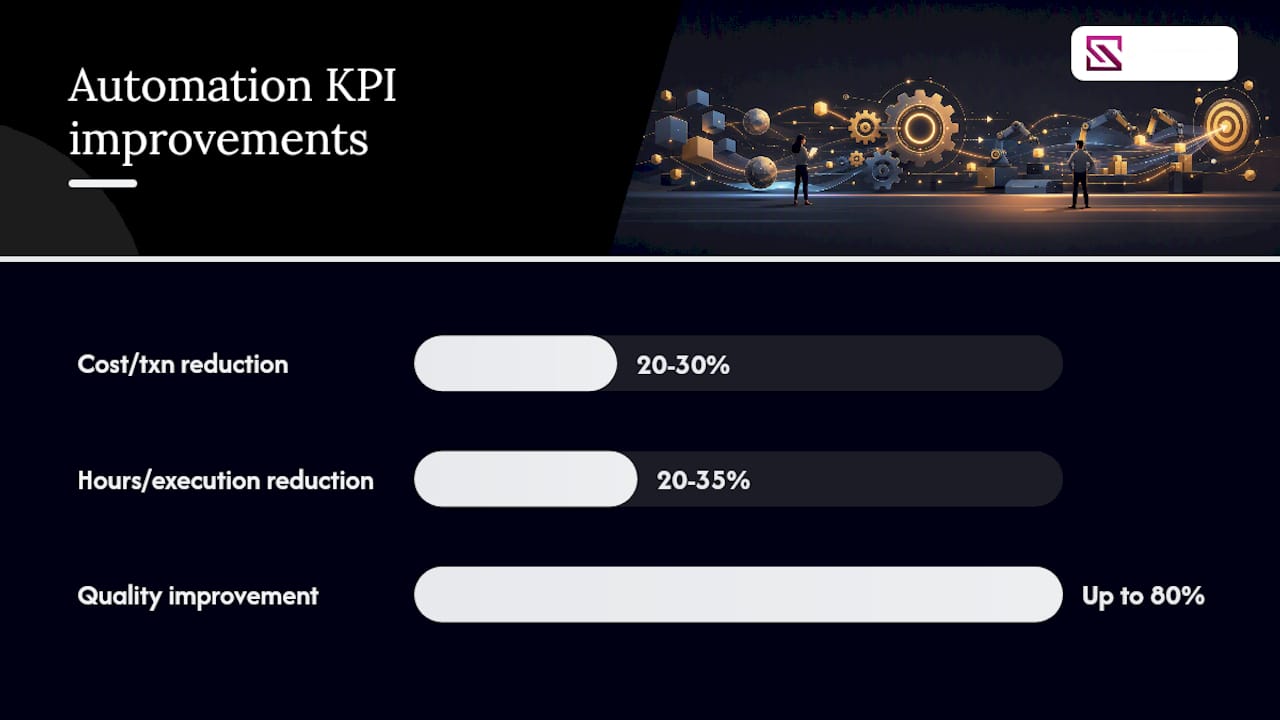
These ranges assume the automated process runs at meaningful volume. A task performed twice a week rarely justifies the engineering cost of automating it. A task performed two hundred times a day almost always does.
Can Automation Handle Growth Without Adding Headcount?
Automation converts manual, location-bound steps into software-driven processes that scale without a linear increase in staff. A person can only process one ticket, one shipment, or one alert at a time. A well-designed automated workflow can absorb a tenfold spike in volume by adding compute capacity, not by hiring and training ten more people over a stressful weekend.
Patterns that support this kind of resilience include:
- Auto-scaling workflows that add processing capacity automatically when queue depth rises.
- Automated routing during surges, so incoming work gets distributed based on current load rather than a fixed assignment.
- Agentic interfaces that reduce the number of screens and systems a human has to touch to resolve an exception, cutting context-switching time.
Scalability only works if the system fails safely. An automated workflow that breaks silently during a traffic spike is worse than a manual process that simply slows down, because nobody notices the failure until customers start complaining.
Pro Tip: Design every automated workflow with a human-in-the-loop exception path from day one. If the automation can't confidently classify or resolve a case, it should route to a person immediately rather than guess. That single design choice prevents the majority of automation horror stories.
Does Automation Improve Decision-Making and Analytics?
Automation makes your KPIs current and actionable instead of a lagging snapshot from last month's spreadsheet. When data flows automatically from the point of work into a dashboard, managers see problems the day they start, not the week after the monthly report goes out.
This shift matters because early detection is cheaper than late correction. Cyndra's operational research points out that automation can transform reporting from manual, lagging spreadsheets into near-real-time controls that surface problems before their costs compound. Digital twins and process-mining models extend this further, letting teams monitor workflow performance continuously and measure incremental improvements as they happen rather than after a quarterly review, a capability documented in Microsoft's business operations toolkit.
For teams managing physical infrastructure, this same principle applies directly to sensor networks and monitoring dashboards. A remote sensor monitoring guide built for decision-makers walks through how live sensor feeds replace end-of-shift reports with continuous visibility.
Statistic callout: The large majority of businesses now using AI for at least one work task, per Coursera's operational efficiency research, suggests automated data pipelines and AI-assisted analysis are becoming the default expectation for operational reporting, not an advanced capability reserved for large enterprises.
How Does Automation Affect Employees and Customer Satisfaction?
Automation reallocates effort from repetitive tasks to higher-value work, and that shift tends to improve both morale and retention. Nobody enjoys re-keying the same data into three systems every morning. Take that task away and give the same person time to actually solve the exceptions that need a human brain, and job satisfaction climbs along with output quality.
Metrics worth tracking on the human side of automation:
- Percentage of employee time spent on value-add tasks versus repetitive administrative work.
- Employee turnover rate in roles touched by automation, before and after rollout.
- Customer-facing metrics: Net Promoter Score, first-response time, and resolution time.
Faster first-response time is one of the clearest customer-facing wins from automation, since routing and triage that used to take a human several minutes now happens instantly. Merge's overview of operational process automation benefits notes that reduced dependency on any single employee's tribal knowledge also means service quality stays consistent even during staff turnover, which customers experience as reliability.
Pro Tip: Communicate automation plans to staff before rollout, not after. Frame it as removing the tasks nobody wanted, not replacing the people who did them. Teams that skip this step almost always face quiet resistance that slows adoption by months.
Which Processes Should You Automate First?
Target high-frequency, low-variation, high-cost tasks first. That single sentence resolves most of the debate teams have about where to start.
A simple scoring framework for prioritizing automation candidates:
- Frequency: how often does this task happen? Daily or hourly beats monthly or quarterly every time.
- Variability: does the task follow the same steps each time, or does every instance require judgment calls?
- Error cost: what does a mistake in this process actually cost, in rework, compliance exposure, or customer trust?
- Technical feasibility: does the data and system access needed to automate this already exist, or does it require new integration work?
- Compliance impact: would automating this process improve or complicate your audit posture?
Score candidate processes against these five criteria, and the highest scorers are almost always your best pilots. Cyndra's operational framework makes a similar case for small, high-impact pilots over sprawling transformation programs, and Beyondsensor's own facility automation playbook applies this exact logic to sensor-first deployments in physical security.
Pro Tip: Run your first pilot with a single owner, a six-to-eight-week timeline, and one clear success metric. Resist the urge to automate three processes at once. A tightly scoped pilot that succeeds builds the internal case for the next ten.
What Are the Biggest Pitfalls in Automation Projects?
Most automation failures trace back to poor governance, inadequate testing, or a scope that grew too ambitious before the team had proven the basics worked. None of these are technology failures. They're project management failures wearing a technology costume.
Common pitfalls and the mitigation that actually addresses each one:
- No version control on workflows. Treat automation logic like code: version it, review changes, and keep a rollback plan ready.
- Missing monitoring. An automated process that fails silently is worse than a manual one that fails visibly. Build alerting in from the start.
- Unclear ownership. Every automated workflow needs one named owner responsible for its health, not a committee.
- No maintenance budget. Automation isn't "set and forget." Microsoft's Well-Architected guidance warns that when automation becomes complex and tightly coupled, maintenance and troubleshooting costs can exceed the original benefit.
- Skipping process redesign. Automating a broken process just makes the broken process run faster. Lean Enterprise Institute's principles argue for standardizing the process itself before layering automation on top.
| Governance Element | What It Prevents |
|---|---|
| Named workflow owner | Orphaned automations nobody maintains |
| Version control on logic | Undocumented changes breaking production |
| Monitoring and alerting | Silent failures going unnoticed |
| Rollback plan | Extended downtime during a bad deployment |
| Maintenance budget line | Technical debt accumulating unchecked |
Pro Tip: Treat any change to an automated workflow's logic the same way you'd treat a change to production code: peer review, staged rollout, and a documented rollback path. Beyondsensor's own automation challenges checklist walks through this governance model in more detail for project managers building their first pilot.
Which Tools Fit Which Automation Problem?
Choose the tool family that fits the task, not the tool that's trending. RPA excels at UI-bound tasks where you're clicking through a legacy application. Infrastructure as Code (IaC) handles environment provisioning. CI/CD pipelines automate software deployment. AI assistants handle ambiguous routing where the rules aren't fully deterministic.
| Use Case | Tool Family | Typical KPI Impact |
|---|---|---|
| Repetitive data entry across legacy UIs | RPA | Cycle time reduction, error rate drop |
| Server and environment provisioning | Infrastructure as Code | Deployment consistency, faster environment spin-up |
| Software release and deployment | CI/CD pipelines | Deployment frequency up, release failure rate down |
| Ambiguous ticket or task routing | AI assistants / agentic tools | First-response time reduction |
| Cross-system data handoffs | Orchestration platforms | Fewer manual handoff errors |
A guide from Klaritea's workflow automation overview breaks down how different automation company types approach these categories, useful reading if you're evaluating outside partners rather than building in-house. For customer-facing automation specifically, Conversational AI's enterprise guide covers the tooling landscape for service automation in more depth.
Microsoft's Well-Architected guidance makes this exact recommendation, and the reduced management burden usually outweighs the missing 20%.* Beyondsensor's tools overview shows how this principle applies to sensor-based automation specifically, mapping common security and industrial tasks to ready-made platforms instead of custom engineering.
What Does Sensor-Driven Automation Look Like in Practice?
A sensor-driven automation deployment in a physical security context typically follows a straightforward pattern: sensor inputs feed an automated triage layer, which routes confirmed events into alerting, ticketing, or escalation workflows without a human reviewing every raw feed first.
The deployment pattern breaks into three stages. Sensors (motion, thermal, access control) generate continuous raw data. An automated triage layer filters that data against rule sets and flags only the events that meet a threshold for human attention. Confirmed events route automatically into the appropriate workflow: a security guard dispatch, a maintenance ticket, or an incident report, depending on what triggered the alert.

Applied to industrial and security sites, this pattern shows the same kind of quality and cost improvement documented in Microsoft's business operations toolkit, where automating high-volume workflows lifted process quality by roughly 80% while cutting cost per transaction by about a third. Beyondsensor's own industrial automation case examples walk through similar deployments, and a related guard response automation playbook covers the procurement side for teams considering this pattern for physical security operations.
Statistic callout: Automated systems consistently apply the same detection rules across every sensor feed, which the Britannica automation overview ties directly to lower variability and fewer missed or duplicated escalations compared to manual monitoring.
Pro Tip: When integrating sensor data with an orchestration platform, define your escalation thresholds before connecting the feed, not after. Teams that skip this step end up drowning operators in false positives during the first week and lose trust in the system before it has a chance to prove itself.
Beyondsensor builds its own platforms around exactly this discipline: sensor precision paired with orchestration logic that filters noise before it reaches a human. For teams evaluating implementation partners for a deployment like this, Beyondsensor's system integrator solutions cover the integration side directly, and the security agency offerings address procurement-facing requirements for government and enterprise buyers. If your organization is scoping a pilot, the Beyondsensor platform overview is the fastest starting point.
An Editorial Take on Where Automation Advice Goes Wrong
Most automation advice treats every process as equally worth automating, and that's the single most expensive mistake ops teams make. The evidence points somewhere narrower: automation pays off fastest and most reliably on high-frequency, low-variation, high-error-cost tasks, and it pays off slowly or not at all everywhere else.
The conventional wisdom also underrates governance. Teams get excited about the automation itself and treat the monitoring, versioning, and ownership model as paperwork to handle later. Microsoft's own guidance is blunt about this: automation that becomes complex and tightly coupled without proper oversight can cost more in maintenance than it ever saved. That's not a footnote. It's the reason so many automation projects deliver a great first quarter and a painful second year.
If there's one thing readers should prioritize over everything else in this article, it's the scoring framework in the prioritization section. Not the tool selection, not the case example, not even the cost ranges. Pick the right process first, and the rest of the implementation becomes dramatically easier. Pick the wrong one, and no amount of governance or tooling will save the project.
Frequently Asked Questions
What is the biggest advantage of operational automation for a mid-size business?
Cost reduction on high-frequency processes tends to deliver the fastest, most measurable win, often in the 20% to 35% range for hours or cost per execution on the right workflow.
How long does it take to see ROI from operational automation?
For high-frequency, high-volume processes, measurable savings typically appear within a few months rather than years, particularly when the pilot is narrowly scoped with a single clear success metric.
Does operational automation eliminate jobs?
It reallocates effort rather than eliminating roles outright in most well-run implementations. Repetitive tasks get automated, and employees shift toward judgment-based work, exception handling, and customer-facing problem solving.
What should I automate first?
Target tasks that happen frequently, follow the same steps each time, and carry a high cost when errors occur. Score candidate processes against frequency, variability, error cost, technical feasibility, and compliance impact before committing to a pilot.
Can automation improve compliance and audit readiness?
Yes. Automated workflows apply the same rules every time and log each step automatically, which produces a stronger, more complete audit trail than manual processes that depend on individual documentation habits.
Sources
- Automate tasks — Power Platform Well-Architected operational excellence
- How to Improve Operational Efficiency
- Streamlining business operations at Microsoft with an AI toolkit
- Operational efficiency strategies that drive structural margin improvement — World Consulting Group
Recommended
- Defining operational efficiency in security: insights & best practices | News | BeyondSensor
- Automation Challenges Checklist for Project Managers | News | BeyondSensor
- How automation strengthens industrial security operations | News | BeyondSensor
- 10 Real-World Industrial Automation Examples Driving Efficiency | News | BeyondSensor
Read More Articles

RTSP Security Risks: Integrators Must Block Exposed Ports 554 and 8554
See how integrators can reduce RTSP security risks: close exposed ports 554 and 8554, secure camera access, and verify each deployment with practical checks.

Require MAEpp and X Accuracy Before You Buy People Counting Systems
Verify people counting accuracy by demanding MAEpp, X Accuracy, and directional-bias reports. Validate on-site with at least 100 events per direction...
30–90 Day Pilot Validates Redundant Camera Networks for Engineers
Standards led, practical steps for engineers to deploy redundant camera networks: MRP, dual homing, and aggregation patterns, commissioning checks, and...

30 Day Pilot Proves Video Analytics Accuracy for Security Teams
Validate video analytics accuracy with scenario tests, camera tuning, transfer learning and a 30 day edge first pilot for security teams.
Let's Build YourSecurity Ecosystem.
Whether you're a System Integrator, Solution Provider, or an End-User looking for trusted advisory, our team is ready to help you navigate the BeyondSensor landscape.
Direct Advisory
Connect with our regional experts for tailored solutioning.