
Ensure your industrial automation project succeeds with this essential checklist. Cover key actions to minimize costly last-minute changes.

Industrial Automation Checklist: Plan, Pilot, and Deliver

A successful industrial automation project comes down to eight non-negotiable actions. Get these right before any design work starts, and you dramatically reduce the risk of costly late-stage changes.
Your top-level industrial automation checklist:
- Write a measurable problem statement tied to a specific process metric (throughput, defect rate, MTTR).
- Map all stakeholders and assign ownership using a RACI before vendor conversations begin.
- Complete a process map and score automation candidates against repeatability, safety, and ROI criteria.
- Define vendor responsibility boundaries for PLC, SCADA, instrumentation, and network in writing.
- Build a component checklist covering I/O counts, sensor types, HMI screens, safety systems, and network architecture.
- Scope a pilot project with documented success thresholds, then run FAT and SAT against signed acceptance criteria.
- Commission with a gate-based checklist: wiring verification, device calibration, network validation, and operator sign-off.
- Define operational KPIs (OEE, MTTR, MTBF, alarm rate) and set a reporting cadence before go-live.
Project phases at a glance: Discovery → Design → Pilot/FAT → Install/SAT → Commission → Operate.
These phases and metrics are not aspirational. They are the contractual anchors that keep vendors, plant teams, and integrators aligned from kickoff through steady-state operation.
Key Takeaways
A successful automation project requires scope, ownership, and acceptance criteria to be locked in writing before programming begins — everything else follows from that discipline.
| Point | Details |
|---|---|
| Define scope before design | Document process states, IO lists, and acceptance criteria before PLC programming starts. |
| Assign named owners | Every deliverable in the vendor responsibility matrix needs a real person, not a job title. |
| Gate FAT and SAT on criteria | Numeric acceptance thresholds (cycle time, yield, alarm rate) must be signed before FAT begins. |
| Measure KPIs from day one | OEE, MTTR, MTBF, and alarm rate must be on a live dashboard before go-live, not after. |
| Beyondsensor for sensor phases | Beyondsensor's deployment utilities and integrator support services accelerate sensor specification and commissioning validation. |
Table of Contents
- What does your industrial automation checklist need before design starts?
- How do you identify and prioritize which processes to automate?
- How do you define vendor and internal roles to prevent scope gaps?
- Which technology components belong on your automation design checklist?
- How should you scope a pilot project and structure FAT and SAT?
- What does a complete commissioning and training checklist look like?
- How do you measure and sustain ROI after go-live?
- What drives automation project costs and how should you set a realistic timeline?
- What are the most costly pitfalls in automation projects and how do you avoid them?
- How do you assess and mitigate risk during automation implementation?
- Which compliance and safety standards apply to industrial automation systems?
- How do you protect industrial control systems from cybersecurity threats?
- How do you manage change and keep stakeholders engaged throughout the project?
- How do you design automation systems for scalability and future growth?
- The three things integrators always check before a project brief is approved
- Beyondsensor maps directly onto your automation checklist
- Sources
What does your industrial automation checklist need before design starts?
The single most expensive mistake in automation projects is starting design work before the problem is fully defined. Project planning guidance is clear: begin with the operating problem, verify field conditions, and write the commissioning plan before equipment arrives.
Writing a usable problem statement
A problem statement earns its place when it answers three questions: What is the current measured performance? What is the target? What is the cost of the gap? "Cycle time is 42 seconds; the target is 30 seconds; each second over target costs $X per shift" is a problem statement. "We need to automate the assembly line" is not.
Tie every goal to a metric that already exists in your plant data. If the metric does not exist, your first action is to create the measurement, not to specify hardware.
Stakeholder map and RACI template
| Role | Responsibility Area | Decision Authority |
|---|---|---|
| Operations Manager | Production targets, shift impact | Approve scope and KPIs |
| Maintenance Lead | Equipment access, spare parts | Approve maintenance plan |
| IT/OT Engineer | Network, cybersecurity, historian | Approve network architecture |
| Quality Manager | Inspection criteria, yield targets | Approve acceptance criteria |
| Procurement | Vendor contracts, lead times | Approve vendor selection |
| Safety Officer | Risk assessment, SIL requirements | Approve safety design |
| Vendor Integrator | Design, build, FAT/SAT delivery | Accountable for deliverables |
Every name in this table should be a real person with a signature authority. A RACI with job titles but no names is a RACI that nobody owns.
Timeline and decision checkpoints
Gate reviews prevent scope drift. Set hard dates for: site assessment complete, functional specification signed, FAT readiness confirmed, SAT window agreed with operations, and handover sign-off. Missing a gate should trigger a formal change-control review, not a quiet schedule slip.
Pro Tip: Lock the FAT date in the contract before programming starts. A fixed FAT date forces the integrator to resolve open items early rather than carry them into site installation, where every change costs three to five times more to fix.
How do you identify and prioritize which processes to automate?
Not every process that can be automated should be automated first. The automation development workflow starts with understanding the mechanical process and its sequence before any control logic is designed. That principle applies equally to candidate selection.
Process-mapping steps
Walk the cell or line and document: inputs, outputs, decision points, operator interventions, and failure modes. Value-stream mapping works well at the plant level; cell-flow mapping gives the granularity needed for control design. The output should be a sequence narrative, not just a P&ID. Sequence narratives capture permissives and interlocks that P&IDs routinely omit, and those omissions become the undocumented logic that audits later flag as risk.
Candidate scoring
Score each candidate process against six criteria. Weight them to match your plant's priorities.
| Criterion | What to Measure | High Score Indicator |
|---|---|---|
| Repeatability | Process variation (Cpk or equivalent) | Cpk ≥ 1.33; low operator-to-operator variation |
| Safety exposure | Injury frequency or near-miss rate | High ergonomic or chemical exposure |
| OEE impact | Contribution to downtime or scrap | Process is a top-three OEE loss driver |
| Operator load | Hours of manual intervention per shift | More than 30 minutes per shift per operator |
| Technical feasibility | Sensor availability, cycle time, access | Standard sensors; accessible mounting points |
| Cost/benefit ratio | Estimated payback period | Payback within 24 months |
Processes that score high on repeatability, safety exposure, and OEE impact with a payback under 24 months are your first candidates. Start there. Avoid beginning with a process that scores high on complexity and low on feasibility, regardless of how attractive the ROI looks on paper.
Real-world industrial automation examples consistently show that the highest-impact early wins come from high-frequency, low-variability tasks where sensor data is already available.
How do you define vendor and internal roles to prevent scope gaps?
Undefined vendor boundaries are the leading cause of scope gaps in automation projects. The CSIA manufacturing automation project guide documents this directly: unclear responsibilities for PLC, SCADA, and instrumentation routinely surface during FAT or SAT, when changes are most expensive to absorb.
Vendor responsibility matrix
Assign a single owner to each deliverable. "Shared" is not an owner.
- PLC code and logic: Integrator (with plant IT/OT review and sign-off)
- HMI graphics and navigation: Integrator (with operations sign-off on screen layouts)
- Instrumentation selection and calibration: Instrumentation vendor or integrator, specified in contract
- Panel fabrication and wiring: Panel builder (may be integrator or subcontractor; state explicitly)
- Network switches and segmentation: IT/OT engineer (plant-side) with integrator providing topology diagram
- Safety PLC and SIL validation: Safety integrator or OEM (requires independent verification)
- FAT execution and test records: Integrator, witnessed by plant operations and quality
- SAT execution and sign-off: Plant operations lead, supported by integrator
Contract clauses that prevent late-stage surprises
Every automation contract should include: documented FAT and SAT acceptance criteria before programming starts; a formal change-control process with written approval and cost impact before any scope change is implemented; source-code and backup delivery to the plant at project close; and defined remote-support terms covering response time, access method, and duration post-handover.
The Solon Consulting automation scope checklist reinforces this: process states, IO lists, acceptance criteria, training scope, and handoff requirements must all be documented before PLC programming begins. Anything undocumented at that stage becomes a change order.
Pro Tip: Require a change-control log as a standing agenda item at every project review. Any verbal agreement to change scope that does not appear in the log within 48 hours is not an approved change. This single discipline prevents the majority of FAT/SAT disputes.
For procurement teams navigating vendor selection and automation tenders, having a signed responsibility matrix in hand before issuing an RFQ gives you a far stronger basis for comparing bids.
Which technology components belong on your automation design checklist?
Thinking of automation as a layered system — mechanical, actuation, sensing, control, safety, HMI, and data — keeps design decisions traceable and prevents components from being specified in isolation. Each layer has dependencies on the layers above and below it.
Component checklist
- PLC platform: Confirm processor capacity (scan time, memory, future I/O headroom of at least 20%), redundancy requirements, and vendor support lifecycle.
- I/O modules: Count all digital and analog points; add 15–20% spare capacity; confirm signal types match field devices.
- HMI screens: Define screen count, navigation hierarchy, and alarm display requirements before graphics are built.
- Historian/data platform: Specify tag count, scan rate, and integration method to MES or ERP.
- Variable-speed drives: Confirm motor ratings, braking requirements, and harmonic mitigation needs.
- Safety PLC: Determine SIL level from risk assessment; specify independently from the standard PLC.
- Robot controllers: Confirm payload, reach, and integration protocol (EtherNet/IP, PROFINET, or equivalent).
Sensor and instrumentation selection
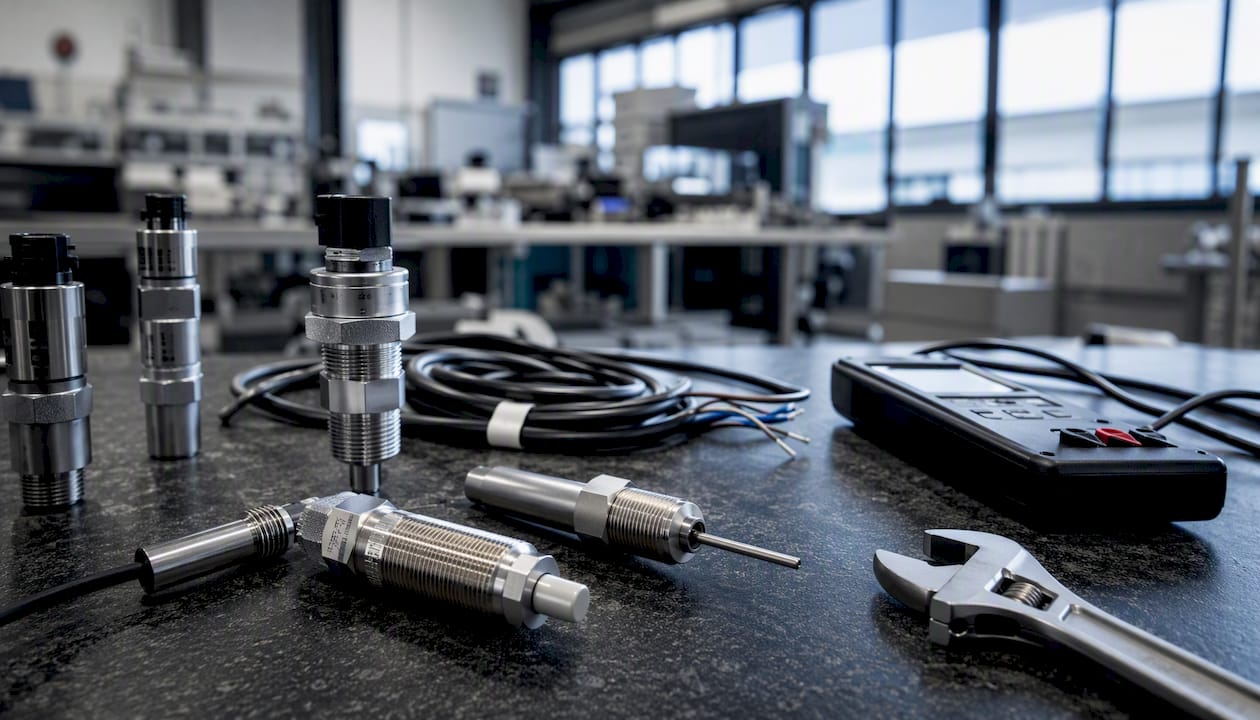
Separate control sensors from quality sensors at the design stage. Control sensors feed the PLC loop; quality sensors feed inspection or SPC systems. Mixing them in a single device creates validation complexity and makes calibration schedules harder to manage. For each sensor, document: measurement range, accuracy class, process connection, output signal, calibration interval, and diagnostic capability.
| Layer | Key Decision Criteria |
|---|---|
| Control sensors | Response time, loop compatibility, diagnostics |
| Quality sensors | Accuracy class, calibration traceability, SPC integration |
| Safety sensors | SIL rating, proof-test interval, redundancy architecture |
| Environmental sensors | IP rating, temperature range, EMC compliance |
Network and cybersecurity at the design stage
Segment OT networks from IT networks at the design stage, not after commissioning. Specify managed switches with port security and VLAN configuration. Define remote-access policy (VPN, jump server, or vendor-specific secure tunnel) before the integrator installs any remote-access hardware. The Siemens Industrial Edge setup model demonstrates how component-by-component validation during setup reduces integration surprises and clarifies exactly when edge apps and field devices are ready for FAT.
For a deeper look at sensor selection trade-offs and monitoring strategies, the sensor technology guide covers the key decisions in practical terms.
How should you scope a pilot project and structure FAT and SAT?
A pilot project is not a proof of concept run on goodwill. It is a controlled test with documented objectives, defined variables, and numeric success thresholds. Without those elements, you cannot declare the pilot a success or failure, and you cannot use it to justify full-scale rollout.

Pilot scope template
Define: the specific process or cell being tested; the duration (minimum two full production shifts); the controlled variables (same operators, same raw material lot, same shift pattern); and the success thresholds tied to your problem statement metrics. Document what "pass" and "fail" look like before the pilot starts.
FAT and SAT checklist
| Test Item | FAT (Factory) | SAT (Site) |
|---|---|---|
| I/O verification | All points checked against IO list | Re-verified after installation |
| Sequence testing | All modes: auto, manual, maintenance | Tested under live process conditions |
| Alarm handling | All alarms triggered and acknowledged | Alarm response tested with operators |
| Recipe/parameter validation | All product recipes loaded and verified | Validated with actual production materials |
| Operator task simulation | Operators complete defined tasks | Operators run full shift unassisted |
| Safety function testing | All safety functions triggered and logged | Repeated after site installation |
| Network connectivity | All devices communicating | Historian and MES data confirmed live |
Pro Tip: Freeze the FAT scope at least two weeks before the FAT date. Any change request submitted after that date goes through formal change control with a cost and schedule impact assessment. This is the single most effective way to prevent the "just one more thing" spiral that derails FAT schedules.
The industrial sensor integration workflow provides additional SAT criteria specifically for sensor-heavy installations, including calibration verification steps and signal validation procedures.
What does a complete commissioning and training checklist look like?
Installation and commissioning checklist
Installation verification:
- Panel installed per approved drawings; cable management complete
- All field wiring verified against IO list (point-to-point check)
- All instruments calibrated and calibration records filed
- Network switches configured; VLANs verified; managed switch logs reviewed
- All safety devices tested and response times recorded
Commissioning gates:
- Power-on check: all devices energized without fault
- Communications check: all devices visible on network
- I/O loop check: all signals verified at PLC
- Sequence dry-run: all modes executed without product
- Operator acceptance run: full production shift with operators
- Sign-off: operations lead and quality sign the commissioning record
Training curriculum
| Audience | Topics | Minimum Duration |
|---|---|---|
| Operators | HMI navigation, alarm response, manual override, recipe selection | 8 hours |
| Maintenance | PLC diagnostics, drive fault recovery, sensor replacement, backup restore | 16 hours |
| IT/OT | Network topology, remote access procedures, historian administration | 8 hours |
Post-handover support items
- As-built drawings and updated P&IDs delivered to plant
- PLC and HMI source code backed up and handed to plant IT/OT
- Spare parts list with part numbers, quantities, and lead times
- Escalation path: first-line support contact, second-line integrator contact, OEM support contact
- 30-day and 90-day post-handover review dates set before handover sign-off
How do you measure and sustain ROI after go-live?
This finding from automation system audits explains why operational discipline matters as much as the initial installation. Systems that are not actively maintained drift from their commissioned state within months.
KPI definitions and reporting cadence
| KPI | Definition | Reporting Cadence |
|---|---|---|
| OEE | Availability × Performance × Quality | Daily (shift-level) |
| MTTR | Mean time to repair unplanned stoppages | Weekly |
| MTBF | Mean time between failures | Monthly |
| Scrap rate | Defective units as a percentage of total output | Daily |
| Alarm rate | Alarms per operator per hour | Daily |
| Uptime | Scheduled production time minus unplanned downtime | Weekly |
Report these metrics on a dashboard visible to operations, maintenance, and management. A metric that nobody reviews does not drive improvement.
Maintenance strategy checklist
- Preventive maintenance schedule loaded into CMMS before go-live
- Predictive maintenance triggers defined (vibration thresholds, temperature limits, current draw baselines)
- Firmware and software update policy documented and approved by IT/OT
- Spare parts inventory verified against the spare parts list at 30-day review
- Annual automation audit scheduled to check documentation accuracy, backup currency, and alarm configuration
What drives automation project costs and how should you set a realistic timeline?
Cost overruns in automation projects almost always trace back to the same drivers: I/O count growth, instrumentation accuracy requirements, custom software integrations, and late scope changes. Understanding these levers before budgeting prevents the most common surprises.
Primary cost drivers
- I/O count: Every additional I/O point adds hardware, wiring, and programming cost. Scope creep in I/O is the most common source of budget overrun.
- Instrumentation accuracy class: Higher accuracy instruments cost significantly more and require more rigorous calibration programs.
- Panel fabrication: Custom enclosures, UL/CE certification, and stainless steel ratings for food or pharma environments add material cost and lead time.
- Software licenses: Historian, SCADA, and MES licenses are often underestimated; confirm per-tag and per-seat pricing before budgeting.
- Custom integrations: Connecting to legacy MES or ERP systems with non-standard APIs is consistently the highest-risk line item for schedule and cost.
- FAT/SAT travel and accommodation: For remote sites or offshore projects, these costs are material and frequently omitted from early estimates.
Sample timeline by project complexity
- Retrofit of a single cell: 3–6 months from scope sign-off to SAT completion
- New production line: 9–15 months from scope sign-off to commissioning
- Full-plant modernization: 18–36 months, phased by production area
Budgeting discipline
Invest early in a detailed IO list and instrument data sheets; the cost of getting these right in engineering is a fraction of the cost of correcting them during FAT. For teams navigating procurement and budget planning, reviewing automation tender structures can provide useful benchmarks for scoping vendor bids.
What are the most costly pitfalls in automation projects and how do you avoid them?
The pattern is consistent across projects of every size. The gap is not technical; it is contractual and procedural.
Common pitfalls and countermeasures
| Pitfall | When It Surfaces | Countermeasure |
|---|---|---|
| Undefined PLC vs. instrumentation scope | FAT or SAT | Responsibility matrix signed before programming |
| Undocumented permissives and interlocks | FAT sequence testing | Sequence narrative required before code review |
| Late vendor scope changes during FAT | FAT week | Change-control clause with written approval required |
| Missing IO list items | Panel build or site install | IO list frozen and signed before panel fabrication |
| Stale or missing backups at handover | Post-handover incident | Backup delivery checklist item at project close |
| Undocumented logic edits post-commissioning | Annual audit | Change-management procedure enforced by IT/OT |
Pro Tip: Run a pre-FAT closure review two weeks before the FAT date. Walk through every open item on the FAT checklist and assign a named owner and a completion date. Any item without a credible completion date before FAT should trigger a schedule conversation immediately, not on FAT day.
The automation challenges checklist for project managers provides gate-review templates that align directly with these countermeasures.
How do you assess and mitigate risk during automation implementation?
Risk in automation implementation is not abstract. It is specific: a sensor that cannot be mounted in the available space, a permissive that was never documented, a network switch that the IT team did not know existed. Effective risk management names these specifics before they become site problems.
Start with a formal risk register at the design stage. For each identified risk, document: the likelihood, the consequence if it materializes, the mitigation action, and the owner. Review the register at every project gate. A risk that has no mitigation action and no owner is not a managed risk.
Common implementation risks and their mitigations:
- Mechanical interference: Conduct a 3D layout review or physical mock-up before panel fabrication.
- Signal noise and EMC: Specify shielded cable and grounding requirements in the design package, not as a site fix.
- Process variability exceeding sensor range: Validate sensor range against worst-case process conditions during design, not during FAT.
- Operator resistance: Involve operators in the pilot scope definition and HMI screen layout reviews.
- Vendor delivery delays: Identify long-lead items at the design gate and place purchase orders before detailed engineering is complete.
The industrial automation challenges resource covers additional risk areas specific to engineering teams, including integration complexity and legacy system constraints.
Which compliance and safety standards apply to industrial automation systems?
Safety and compliance are not optional line items. They are design inputs that determine architecture, component selection, and validation scope.
The primary standards framework for industrial automation safety is IEC 62061 and ISO 13849, which define how to assess and achieve Safety Integrity Levels (SIL) and Performance Levels (PL) for safety functions. The applicable standard depends on the type of machinery and the nature of the safety function. Both require a documented risk assessment before safety system design begins.
For functional safety of electrical, electronic, and programmable systems in process industries, IEC 61511 applies. For general industrial machinery, the Machinery Directive (in applicable markets) and OSHA 29 CFR 1910.147 (lockout/tagout) set baseline requirements for energy isolation and safe maintenance access.
Network and control system security standards are addressed separately under IEC 62443, which defines security levels for industrial automation and control systems (IACS) and assigns responsibilities to asset owners, system integrators, and product suppliers. Compliance with IEC 62443 is increasingly required in contracts for critical infrastructure and regulated industries.
Document every applicable standard in the design specification. Assign responsibility for compliance verification to a named person, and include compliance sign-off as a commissioning gate criterion.
How do you protect industrial control systems from cybersecurity threats?
OT cybersecurity is no longer a concern only for critical infrastructure operators. Any networked automation system is a potential target, and the consequences of a control system compromise range from production loss to physical safety incidents.
The foundational principle is network segmentation. OT networks must be separated from IT networks and from the internet by a demilitarized zone (DMZ) or industrial firewall. Remote access to OT systems must route through a jump server or secure VPN with multi-factor authentication, never through direct internet-facing connections.
Practical cybersecurity checklist for industrial control systems:
- All default passwords changed on every device before commissioning
- Remote access policy documented and approved by IT/OT before any vendor connection is established
- Managed switches configured with port security, unused ports disabled
- Firmware update schedule defined and approved for all networked devices
- Incident response plan documented and tested before go-live
- Asset inventory maintained and updated whenever a device is added or replaced
The industrial security operations resource covers how automation and monitoring tools can strengthen OT security posture, including exception-based monitoring approaches that reduce the manual oversight burden on plant teams.
How do you manage change and keep stakeholders engaged throughout the project?
Change management is where technically sound projects fail. Operators who were not consulted during design resist the system at go-live. Maintenance teams who were not trained cannot support it. Management who were not updated lose confidence before the system proves its value.
A communication plan is not a project newsletter. It is a structured schedule of specific messages, to specific audiences, at specific project milestones, with a named sender and a feedback mechanism.
Communication plan structure
- Kickoff: Communicate project objectives, timeline, and impact on each team to all stakeholders. Name the project lead and the escalation path.
- Design gate: Share the functional specification summary with operations and maintenance leads. Collect written feedback before the design is frozen.
- Pre-FAT: Brief operators on what the FAT will test and what their role is. Address concerns about job impact directly and factually.
- Pre-SAT: Confirm training schedule, shift coverage during installation, and production impact with operations management.
- Go-live: Communicate the support plan for the first 30 days. Name the first-line contact for every shift.
- 30-day review: Share KPI results against targets with all stakeholders. Acknowledge gaps and state the improvement actions.
Resistance to automation is almost always a symptom of inadequate communication, not opposition to technology. Operators who understand why a change is happening and what it means for their role are far more likely to support it.
How do you design automation systems for scalability and future growth?
The architecture decisions made in the first project determine what is possible in the next five. A system designed only for today's requirements often becomes the bottleneck that prevents tomorrow's expansion.
These reserves cost a fraction of a retrofit.
Choose controller platforms and software versions that have a documented vendor support lifecycle of at least ten years. A PLC platform that reaches end-of-support in three years will require a migration project before it has paid back its installation cost.
Standardize on open communication protocols (OPC-UA, MQTT, EtherNet/IP) rather than proprietary interfaces wherever possible. Open protocols preserve your ability to integrate new sensors, analytics platforms, or MES systems without being locked into a single vendor's ecosystem. The facility automation process playbook covers a sensor-first approach that keeps integration options open as plant requirements evolve.
Plan for edge computing from the start. Edge platforms that process data locally before sending to cloud or enterprise systems reduce latency, lower bandwidth costs, and keep OT data within the plant boundary. Designing the network architecture to accommodate edge nodes from day one is far less disruptive than retrofitting it later.
The three things integrators always check before a project brief is approved
Most automation projects that run over budget or over schedule share a common origin: the brief was incomplete when programming started. From a system integrator's perspective, three items determine whether a project is ready to proceed.
First, a signed functional specification that includes sequence narratives, not just P&IDs. P&IDs show what is connected; sequence narratives show what the system must do, in what order, under what conditions. Without sequence narratives, the integrator writes logic based on assumptions, and those assumptions become change orders.
Second, a completed IO list with signal types, ranges, and device tags confirmed against the physical plant. An IO list built from drawings alone will have errors. An IO list verified in the field will not. The difference shows up at FAT.
Third, a named plant-side project lead with authority to approve changes and sign acceptance criteria. Projects without a single accountable plant contact tend to accumulate verbal scope changes that nobody formally approved and nobody formally budgeted.
The first 90 days after handover are the most revealing period of any automation project. Systems that were commissioned correctly and handed over with complete documentation stabilize quickly. Systems that were handed over with open items, missing backups, or untrained operators generate a support burden that consumes the integrator's margin and the plant's confidence. The 90-day post-handover review is not a formality. It is the moment when the project either proves its value or reveals what was left undone.
Beyondsensor maps directly onto your automation checklist
Beyondsensor's sensor-based solutions address the checklist phases where projects most often stall: sensor selection, integration planning, and commissioning validation. For system integrators and plant teams working through the technology and components phase, Beyondsensor's ecosystem matchmaking and deployment utilities help match the right sensing hardware to each control and quality measurement point, reducing the specification effort that typically consumes weeks of engineering time.

For integrators managing multi-site or phased rollouts, Beyondsensor's system integrator support services provide localized validation expertise across Singapore, Malaysia, and the Philippines, with Thailand and Vietnam coverage expanding. The practical result: sensor specifications that arrive at FAT already validated against the process conditions, not discovered to be wrong during acceptance testing. Contact Beyondsensor to request a deployment planning consultation aligned to your project's current phase.
Sources
The sources below support the checklist phases covered in this guide and are worth consulting directly for templates, standards, and deeper procedural guidance.
- Automation Scope Checklist | Solon Consulting
- Industrial Automation Project Planning Guide | Automations Engineering
- Setting up Industrial Edge tutorial
- Automation 101: A Guide for Startups and New Machine Builders
Recommended
- Automation Challenges Checklist for Project Managers | News | BeyondSensor
- List of Industrial Automation Challenges for Engineers | News | BeyondSensor
- 10 Real-World Industrial Automation Examples Driving Efficiency | News | BeyondSensor
- Industrial Sensor Integration Workflow: 2026 Engineer's Guide | News | BeyondSensor
Read More Articles
RTSP Security Risks: Integrators Must Block Exposed Ports 554 and 8554
See how integrators can reduce RTSP security risks: close exposed ports 554 and 8554, secure camera access, and verify each deployment with practical checks.

Require MAEpp and X Accuracy Before You Buy People Counting Systems
Verify people counting accuracy by demanding MAEpp, X Accuracy, and directional-bias reports. Validate on-site with at least 100 events per direction...

30–90 Day Pilot Validates Redundant Camera Networks for Engineers
Standards led, practical steps for engineers to deploy redundant camera networks: MRP, dual homing, and aggregation patterns, commissioning checks, and...

30 Day Pilot Proves Video Analytics Accuracy for Security Teams
Validate video analytics accuracy with scenario tests, camera tuning, transfer learning and a 30 day edge first pilot for security teams.
Let's Build YourSecurity Ecosystem.
Whether you're a System Integrator, Solution Provider, or an End-User looking for trusted advisory, our team is ready to help you navigate the BeyondSensor landscape.
Direct Advisory
Connect with our regional experts for tailored solutioning.