
Practical CCTV bandwidth planning for integrators: use a codec-aware calculator, size links for 2–3× peak bursts, and confirm results with pilot...

Plan for 2–3× Peak Bursts: CCTV Bandwidth Planning for Integrators

Budget a few Mbps per 1080p camera on H.265 and somewhat more on H.264, with 4K requiring noticeably higher bandwidth on H.265. Run those numbers through a codec-aware calculator, then validate everything with an on-site pilot before you sign off on switch or storage specs.
TL;DR:
- Account for scene complexity, GOP length, and substreams, which can cause actual bandwidth to exceed datasheet estimates by up to 1.6 times.
- Plan uplinks at 1.2 to 1.3 times the calculated aggregate and keep utilization below 80% to prevent choke points during peak activity.
- Size PoE power budgets with a 20% to 30% margin for IR illuminators and heaters, and verify switch and NIC specs against actual device datasheets.
- Measure real network usage during busy periods before final deployment, rather than relying solely on calculator estimates or datasheet figures.
Table of Contents
- How to Plan CCTV Bandwidth Using a Calculator
- What Are the Five Drivers of Per-Camera Bandwidth?
- How Much Do Codec and GOP Settings Change Bandwidth?
- How Do You Size the Uplink, Switch, and PoE Budget?
- How Do You Calculate Storage From Bitrate and Retention?
- What Mistakes Cause Bandwidth Planning Failures?
- What Should Installers Verify at Commissioning?
- How BeyondSensor Supports Bandwidth and PoE Planning
- What a Systems Integrator Would Tell You About This Math
- Get Pilot-Tested Bandwidth Numbers Before You Commit
- Sources
- FAQ
How to Plan CCTV Bandwidth Using a Calculator
A bandwidth calculator is only as good as what you feed it. Get the inputs wrong and the output looks precise while being completely useless in the field.
Every serious CCTV bandwidth calculator asks for the same core variables: camera count, sensor resolution in megapixels, frame rate, codec, GOP or I-frame interval, scene complexity, retention days, and the number of simultaneous viewers plus substreams. Multi-sensor cameras (the four-lens panoramic units common in parking structures) need to be entered as separate channels, not one line item, because each sensor encodes its own stream. Dual-streaming cameras, where a full-resolution stream feeds the recorder and a lower-resolution substream feeds live viewing, need both streams counted separately in your total.
Scene complexity is where most integrators guess instead of measure. A loading dock with constant forklift traffic behaves nothing like a quiet corridor, even at identical resolution and frame rate.
Overhead matters just as much as the raw video math. Add 20% to 30% on top of your calculated video bitrate to account for RTP/RTSP packet headers and protocol overhead, and lean toward the higher end if cameras share a corporate network or use multicast.
- Camera count and sensor type (single vs. multi-sensor)
- Resolution, frame rate, codec, and GOP length
- Scene complexity rating per camera zone
- Retention period and simultaneous viewer/substream count
- Network overhead allowance of 20 to 30%
What Are the Five Drivers of Per-Camera Bandwidth?
Per-camera bitrate isn't one number. It's the product of five variables interacting with each other, and treating any single spec sheet figure as gospel is how uplinks get undersized.
- Resolution and frame rate baseline — the raw pixel and frame data before compression.
- Codec efficiency — how much the encoder shrinks that raw data.
- GOP/I-frame interval — how often a full reference frame gets inserted.
- Scene complexity — motion, contrast, and detail density in the actual footage.
- Rate control mode — VBR or CBR, which determines how the encoder responds to that complexity.
A usable calculation template looks like this: Base bitrate × (FPS / 25) × codec factor × scene factor × quality factor.
Real installations run at 0.4× to 1.6× of manufacturer datasheet numbers, largely because datasheets assume ideal lab conditions that rarely match a working loading dock or a busy retail floor.
Take a mixed 16-camera retail deployment: 10 fixed 1080p cameras at 3 Mbps average on H.265, 4 wide-angle 4K cameras at 10 Mbps each on H.265, and 2 high-motion entrance cameras at 5 Mbps due to elevated scene complexity, considering Next-Gen IP Security Cameras for optimal hardware selection. That's 30 + 40 + 10, or 80 Mbps raw video before overhead.
How Much Do Codec and GOP Settings Change Bandwidth?
Codec choice is the single biggest lever you control. H.265 typically cuts bitrate roughly in half compared to H.264 at equivalent perceptual quality, and H.265+ or other smart-codec variants can shave another 20% to 40% off static scenes like empty hallways or fixed-angle parking rows. AV1 offers better theoretical efficiency still, but it remains rare in commercial IP cameras and you shouldn't plan around it for a 2026 deployment.
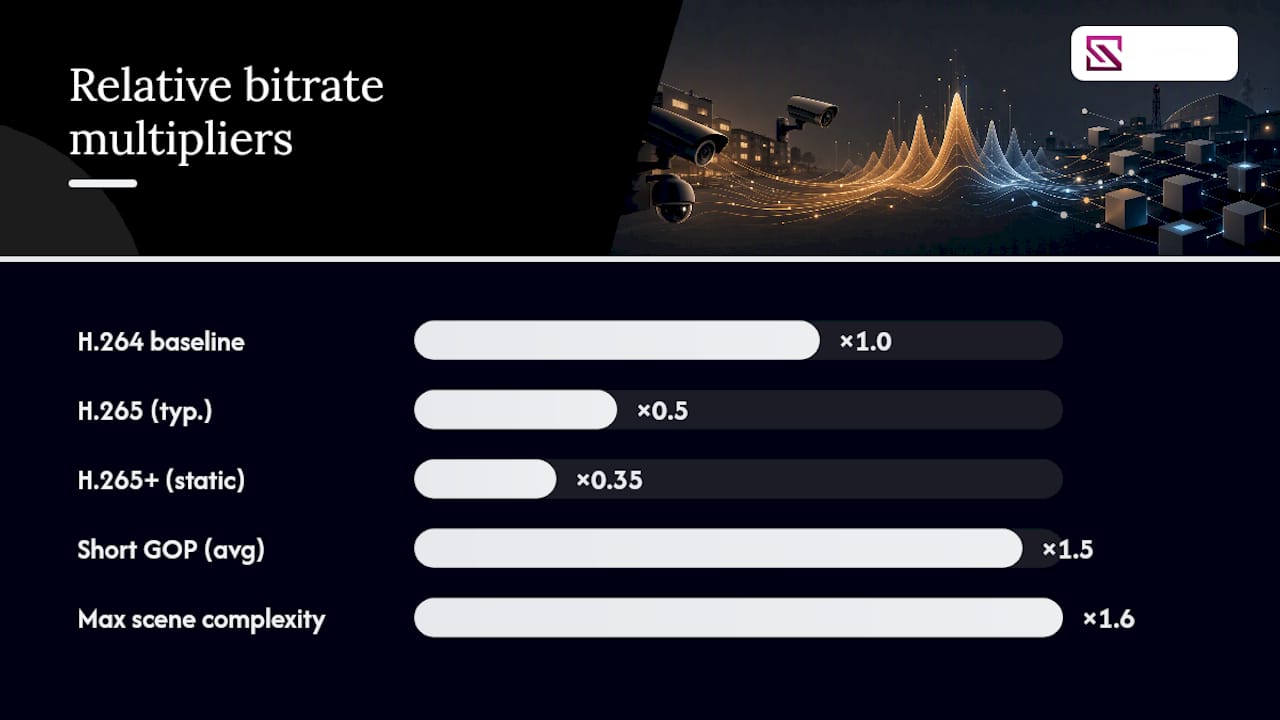
Scene complexity swings bitrate by 0.4× to 1.6× around your baseline estimate, which is why a static warehouse aisle and a windy outdoor plaza on the same camera model can post wildly different real-world numbers.
GOP length is the trade-off nobody explains well. Shortening the I-frame interval improves seek responsiveness during playback but can raise average bitrate by 40% to 60%, since I-frames carry far more data than the P-frames between them. A 1-second GOP feels great during an investigation but taxes your uplink every second, all day.
- H.265 vs. H.264: roughly 50% savings
- H.265+/smart codec on static scenes: additional 20 to 40% savings
- Shorter GOP: 40 to 60% higher average bitrate
Pro Tip: Before you count on smart-codec savings, confirm your VMS or NVR actually decodes H.265+ natively. If it doesn't, the system re-encodes the stream and you lose every bit of the projected reduction.
How Do You Size the Uplink, Switch, and PoE Budget?
Your calculated aggregate is a starting point, not a design spec. Sustained utilization should stay under 80% of nominal link capacity, and design bandwidth should run 1.2 to 1.3 times your calculated aggregate to absorb synchronized I-frame bursts across multiple cameras firing at once. Risk-averse deployments, especially ones covering critical infrastructure, often plan for 2 to 3 times average to leave real headroom.
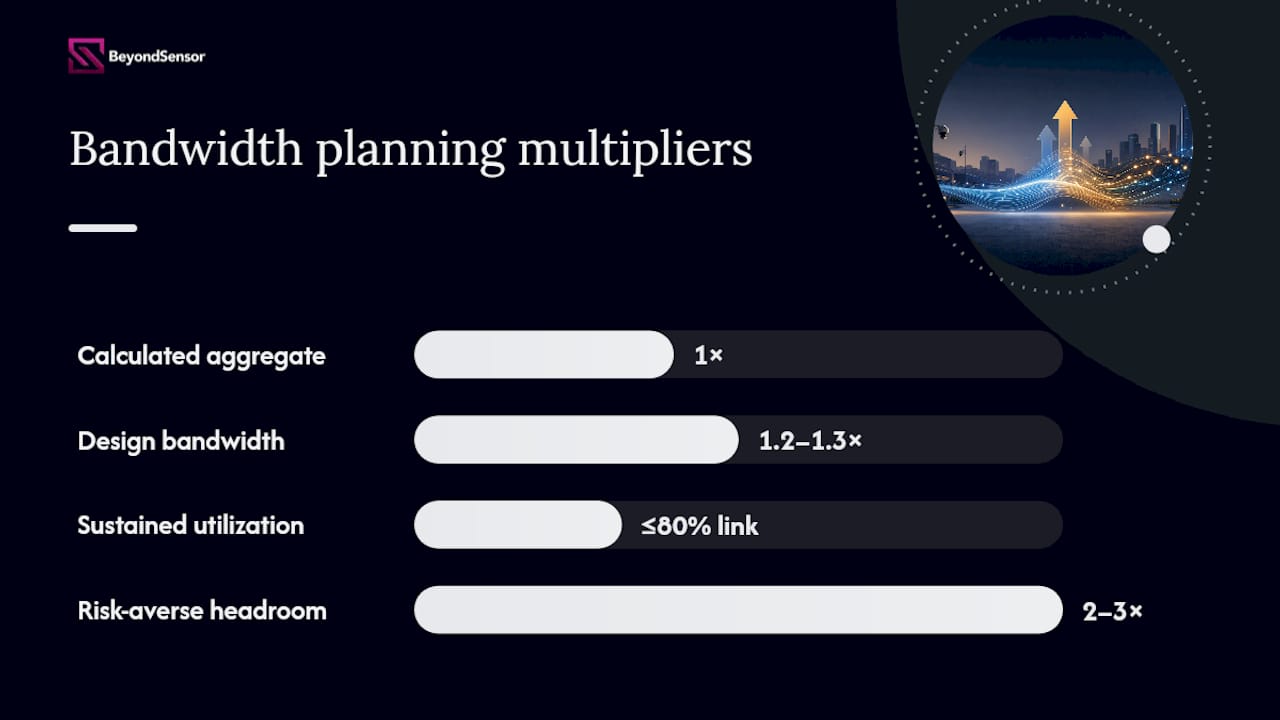
Gigabit uplinks handle most single-switch deployments comfortably. Once you're aggregating multiple switches or running 4K cameras at scale, check whether your NVR's network interface card and switch backplane can actually sustain 10GbE throughput, not just advertise the port.
PoE budgets get underestimated more often than bandwidth does. Size PoE for peak or night draw, when IR illuminators and heaters pull maximum current, and add a 20% to 30% margin on top. Verify the per-switch, per-model PoE budget against the datasheet rather than assuming every port delivers full power simultaneously.
- Sustained utilization: under 80% of link capacity
- Design bandwidth: aggregate × 1.2 to 1.3, or 2 to 3× for high-risk sites
- PoE: size to peak/night draw plus 20 to 30% margin
- Confirm NIC, backplane, and switch PoE specs against real datasheets, not marketing pages
For sites where uplink failure is unacceptable, a redundant path or warm standby architecture removes a single point of failure from the design entirely.
How Do You Calculate Storage From Bitrate and Retention?
Storage sizing works backward from retention, not forward from disk size. The formula is straightforward: per-camera Mbps × seconds per day × retention days, converted to bytes, gives you total terabytes needed.
- Convert Mbps to MB per second (divide by 8).
- Multiply by 86,400 seconds to get daily megabytes per camera.
- Multiply by your retention window (commonly 30 to 90 days).
- Sum across all cameras, then convert to terabytes.
Continuous recording at those numbers demands far more capacity than motion-triggered recording, since motion-only clips skip the idle hours that make up most of a typical day at a low-traffic site.
Longer retention windows scale linearly, so a jump from 30 to 90 days triples your storage requirement, not just your budget line. Check your NVR or DAS write throughput against your aggregate incoming bitrate, confirm RAID configuration for the drive count, and reserve headroom for cameras you'll add within the next 12 to 18 months. Retention policy decisions belong in your data governance documentation as much as your network design.
What Mistakes Cause Bandwidth Planning Failures?
Most bandwidth failures trace back to a handful of repeat mistakes.
- Sizing to average instead of peak. Synchronized I-frame bursts across a dozen cameras can spike well above your calculated average, and undersized links choke exactly when incident footage matters most.
- Trusting datasheet CBR figures without field validation. On-site pilot measurement during a representative busy period reveals what the spec sheet doesn't.
- Forgetting substreams and remote-viewing uploads. Every simultaneous viewer pulling a live feed adds load your recording-only calculation missed.
- Mixing smart codecs with a non-aware VMS. The savings evaporate the moment the platform re-encodes instead of passing the stream through.
What Should Installers Verify at Commissioning?
Handover is where planning assumptions either hold up or get exposed. Work through this before signing off:
- Record each camera's model, resolution, frame rate, codec, GOP setting, and assigned scene complexity rating.
- Document the substream plan, retention period, and expected simultaneous viewer count.
- Measure actual per-camera Mbps during a busy period, not idle hours.
- Run an uplink saturation test under that busy-period load.
- Test PoE draw under night conditions with IR illuminators active.
- Deliver a measured bitrate report, VLAN isolation proof, and NVR incoming-bandwidth test as sign-off documentation.
Cameras and switches sitting on isolated VLANs, verified with an IP subnet plan, close the loop between design intent and installed reality.
How BeyondSensor Supports Bandwidth and PoE Planning
Beyondsensor builds sensor-based security and operational solutions for industrial automation, environmental monitoring, smart infrastructure, and physical security deployments, which means bandwidth math isn't an academic exercise for us. Our hardware-software solutions and sensing tools are built around the same commissioning discipline this article recommends: measure, don't guess.
The PoE Power Budget Calculator complements every bandwidth figure you calculate here, letting you cross-check power draw against network load before you finalize switch selection.
What a Systems Integrator Would Tell You About This Math
Overbuild headroom and isolate your camera VLAN before you chase the cheapest switch quote. Run the numbers, then trust the pilot over the spreadsheet.
— Eumir
Get Pilot-Tested Bandwidth Numbers Before You Commit
A calculator gives you a planning estimate; a pilot measurement tells you what your network will actually carry once cameras go live. Beyondsensor's tools hub puts the PoE Power Budget Calculator and related planning utilities in one place, so integrators can cross-check bandwidth, power, and subnet decisions without juggling three separate spreadsheets.

For deployments where the stakes are higher than a small office lobby, that means pairing your bandwidth math with real sensing hardware validated for the same industrial and infrastructure environments Beyondsensor already serves. If you're sizing a project past 16 cameras or mixing multi-sensor units into an existing switch stack, start with the tools hub and request pilot measurement support before you finalize hardware orders.
Sources
- CCTV Bandwidth Calculator — Free IP Camera Network Estimator | CCTVplanner
- CCTV Bandwidth Calculator | IP Camera Network Bandwidth (Mbps) | MEPBase Tools
- CCTV Network Design Guide: Bandwidth, Storage, PoE, and Network Security | TP-Link Philippines
- Video Surveillance Calculator: Bandwidth & Storage Estimator for IP Camera Systems | Arxys
FAQ
What Are the Bandwidth Requirements for a CCTV Camera?
Budget a few Mbps per 1080p camera on H.265 and somewhat more on H.264, with actual usage depending heavily on scene complexity and GOP setting.
How Do You Calculate CCTV Bandwidth?
Multiply your base resolution/frame-rate bitrate by a codec factor, a scene complexity factor, and a rate-control quality factor, then add 20% to 30% network overhead; run the result through a codec-aware calculator and confirm it with an on-site pilot measurement.
Do Security Cameras Take Up a Lot of Bandwidth?
Individual cameras usually consume a modest 2 to 16 Mbps depending on resolution and codec, but a multi-camera site adds up fast, especially when substreams and remote viewers are counted alongside recording traffic.
What Are the Bandwidth Requirements for a 4K Security Camera?
4K cameras require noticeably higher bandwidth on H.265 compared to 1080p, with H.264 demanding more bandwidth than H.265 at equivalent quality, and high-motion scenes increasing bitrate.
Is VBR or CBR Better for CCTV Bandwidth Planning?
VBR lets bitrate flex with scene complexity, saving bandwidth during quiet periods but spiking during motion, while CBR holds a steady rate that's easier to plan for but wastes capacity on static footage; most professional deployments favor VBR paired with headroom sized for its peaks.
Recommended
Read More Articles
Stop Silent Failures: Sensor Health Monitoring for Ops & Procurement
Procurement and ops: require heartbeat intervals, drift limits, PDR targets, and network security to stop silent sensor failures.
Secure AI Model Drift in 90 Days: Six Actions for Security Teams
Stop AI model drift breaking security controls. Six actions to finish in 90 days, with monitoring metrics, procurement SLAs, and incident response steps.
5 ONVIF profile checks every integrator must run before buying cameras
Default to Profile T for new cameras. Add Profile G for local recording and Profile M for analytics. Verify each model on the ONVIF Conformant Products...
Plan 12–18 Month Retraining: Smart City Surveillance for Planners
Practical guidance for planners deploying smart city surveillance: pilot narrowly, with privacy by design, and budget 12–18 months for retraining.
Let's Build YourSecurity Ecosystem.
Whether you're a System Integrator, Solution Provider, or an End-User looking for trusted advisory, our team is ready to help you navigate the BeyondSensor landscape.
Direct Advisory
Connect with our regional experts for tailored solutioning.